
Last Updated: November 2, 2026
Quick Summary
Industrial mesh networking is worth it when your job site is large, your layout changes, and downtime costs more than the hardware. It is not worth it when your site is small, fixed, and already wired, where a handful of access points and a fiber backbone often run fine.
Industrial mesh networking is a wireless architecture where every node connects to multiple others, so traffic finds a path even when one link fails. That redundancy is the whole pitch. On a job site, it means a machine operator’s tablet keeps its connection while a haul truck rolls between benches.
Mesh is worth it when your site is large, your layout changes, and downtime costs more than the hardware. It is not worth it when your site is small, fixed, and already wired.
Here is what that looks like in practice. A fixed crushing plant with a stable layout often runs fine on a handful of access points and a fiber backbone. A moving open-pit operation is a different problem entirely. Nodes go up on light plants, service trucks, and portable trailers. Coverage has to follow the work, not the other way around.
The FCC guidance on unlicensed wireless equipment governs what radios you can deploy without a license, which shapes every design decision on a site like this.
Below, we break down where mesh earns its cost, where it doesn’t, and how to plan a deployment that survives the job.
The core advantage of an industrial mesh network is resilience through redundancy. When one mesh node drops, traffic reroutes through its neighbors instead of dying at a dead zone. On a site where a downed link can stall a dispatch system or a safety alert, that self-healing behavior is the reason to pay for mesh.
The core disadvantage is complexity. Every node is a potential configuration problem, and a poorly planned mesh can carry traffic through too many hops, adding latency and cutting throughput.
Advantages:
Disadvantages:
A common mistake is treating mesh as a magic fix for coverage gaps. It isn’t. Mesh moves traffic around obstacles; it does not create signal where the RF design never put it.
Point-to-point vs. mesh networking comes down to one question: does your layout move? Point-to-point links two fixed locations with a dedicated, high-throughput shot. Mesh connects many nodes in a decentralized network that can grow and shift.
For a fixed port terminal linking two buildings across a yard, point-to-point is usually the cleaner, faster answer. For a construction site where crews and trailers relocate weekly, a dynamic mesh gives you coverage that follows the work.
Use this decision framework:
| Site Condition | Better Fit | Why |
|---|---|---|
| Fixed layout, two locations | Point-to-point | High throughput, simple topology |
| Layout changes monthly | Mesh | Nodes move with crews |
| Many devices, wide area | Mesh | Coverage scales with nodes |
| Single high-bandwidth link | Point-to-point | Dedicated backhaul capacity |
| Mixed fixed and mobile assets | Hybrid | Fixed backbone plus mesh edge |
Most real job sites land on a hybrid: a point-to-point backhaul to a fixed tower, then mesh nodes covering the active work area. That combination gives you throughput where it’s stable and flexibility where it isn’t.
Wireless network planning for construction sites starts with a site walk, not a spreadsheet. You need to know where the work will be in six months, where the steel and concrete will block signal, and which machines generate interference.
A mesh network is only as good as its RF plan. We map coverage against the actual terrain and structures, then place nodes where they’ll still make sense after the site changes. That planning step is where most deployments succeed or fail.
NIST cybersecurity guidance for operational technology is worth reading before you connect OT systems to any wireless network, because segmentation decisions belong in the plan, not the afterthought.
Skipping the site survey is a common reason a mesh deployment underperforms. Nodes placed by guesswork create coverage gaps that are hard to fix with added hardware.
If you want to see how a designed mesh performs on an open-pit site, our mesh radio network guide for open pit mining walks through the antenna choices that make it work. And when you’re ready to have a plan built for your site, our team handles network design and build for mobile mesh deployments.
Rugged wireless networking equipment is what helps a network hold up under dust, vibration, and temperature swings on a job site. Job sites punish hardware: vibration, temperature swings, dust, and moisture all attack the same enclosure. Reliable connectivity serves as the essential foundation for advanced site analysis, including the integration of drone 3D mapping to track progress across these challenging environments.
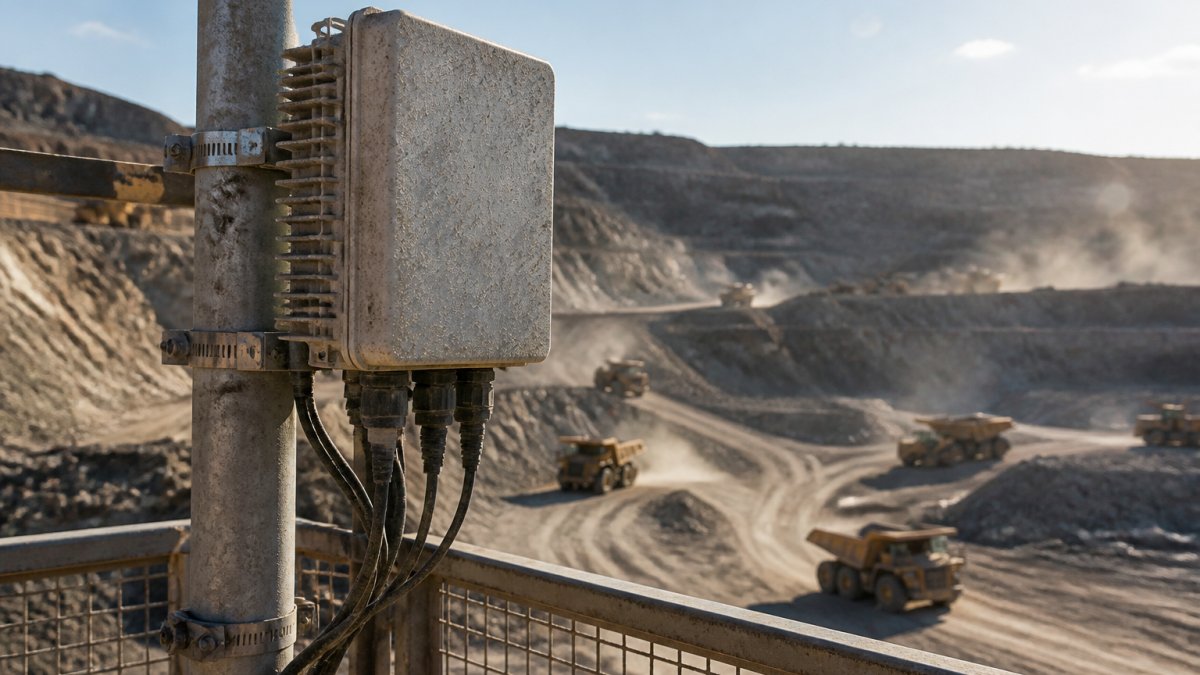
Look for IP-rated enclosures, wide operating temperature ranges, and mounting hardware that survives vibration. A wireless router rated for an office closet will not survive a haul truck’s wake.
What to check before you buy:
Job-site conditions add specific stresses that consumer gear is not designed for. Dust from crushing and hauling can clog cooling vents and coat connectors; enclosures rated for dust and water ingress (such as IP66 or IP67) are common on industrial nodes. Vibration from heavy equipment and blasting can loosen mounts and fatigue solder joints; vibration-rated mounting hardware and shock-resistant electronics matter.
We build our own line of network equipment for exactly these conditions, and our rugged networking equipment guide covers the full selection criteria in more depth. When specifying nodes, match the enclosure rating to the exposure: a node on a fixed pole in an open yard may need a different rating than one mounted on a mobile trailer that sees road spray and vibration.
Mesh vs. cellular is the comparison most buyers get wrong. Cellular is typically quick to start, while mesh requires more upfront design work.
A cellular modem gives you internet access wherever coverage exists, but you don’t own the network, you can’t segment it the way you want, and coverage in a pit or behind a berm is often a dead zone. Private LTE and 5G give you control but carry significant build cost and spectrum considerations. Point-to-point delivers dedicated throughput between fixed points but doesn’t cover a moving footprint.
Total cost of ownership is where the decision usually lands. Mesh hardware and design cost more upfront than a few cellular modems. Whether that pays back depends on project length, recurring data costs, and downtime exposure, so the right answer varies by site.
To make that comparison concrete, break total cost of ownership into these line items:
On the benefit side, quantify avoided downtime. If a dispatch system or safety alert depends on the network, every hour of outage has a cost in idle labor and delayed decisions. A common pattern is that the payback period for mesh versus cellular comes down to how many outage hours the site avoids per month and how much those hours cost.
Pricing depends on node count, site conditions, and service scope, so current pricing and quotes are available through our website. For a structured way to evaluate the equipment side, our network equipment line is built for these conditions, and our rugged networking equipment guide covers selection criteria in more depth.
A network design review is the cheapest insurance you can buy before committing capital to a mesh deployment. It validates your topology, node placement, and backhaul plan against the site you actually have, not the one on the drawing.
We can begin with an industrial wireless site survey and RF mapping to evaluate the design against your coverage, security, and uptime requirements. If mesh isn’t the right answer for your site, we’ll tell you, and point-to-point or a hybrid may serve you better.
The question worth asking isn’t whether mesh is worth it in general. It’s whether it’s worth it for your site, your layout, and your downtime costs. That answer comes from a design review, not a brochure.
An industrial mesh network is a wireless system where each node connects to multiple others, passing traffic along whichever path is strongest. On a job site, nodes mount on equipment, poles, or temporary structures, and the network reroutes automatically when a node drops or a haul truck blocks a signal path. This self-healing behavior keeps connection reliability steady across large spaces, complex layouts, and areas where thick walls or signal interference would otherwise create dead zones.
Reliability depends on the equipment and the design. Mesh nodes built for industrial use are IP-rated against dust and water, tolerate vibration, and handle wide temperature swings. The redundancy built into a mesh topology means a single node failure does not take down the network, because traffic reroutes through other nodes. That said, reliability still requires proper site survey, node placement, and backhaul planning. A mesh deployed without planning can perform worse than a simpler point-to-point link.
Choose mesh when you need coverage across a large or changing area with many connected devices and mobile workers, such as machine operators and floor supervisors moving between zones. Point-to-point suits fixed, high-bandwidth links between two buildings or a remote gate and a control room. If your site layout shifts every few months, mesh nodes reposition more easily. If you need one stable long-distance link, point-to-point usually costs less and delivers higher throughput.
A typical deployment includes rugged mesh nodes or access points, industrial antennas, mounting hardware rated for outdoor exposure, and a backhaul path to the internet or your business network, often via fiber, cellular modem, or a point-to-point link. You also need power at each node location, either wired or solar, and network management software for monitoring. Northwest Towers supplies rugged wireless networking equipment and can design, deploy, and monitor the full system through its Network as a Service model.
If your site moves, your network has to move with it. Northwest Towers designs rugged industrial wireless networks and backs them with network engineering, deployment, and managed services, including Network as a Service with little to no capital investment, so you get connectivity without building a dedicated IT team. Get started with Northwest Towers and put a network on your site that survives the job.