
Last Updated: October 25, 2026
Quick Summary
To prevent moisture ingress in outdoor industrial wireless enclosures, seal every entry path with compressed gaskets, bottom-mounted waterproof cable glands, and weather covers, then manage condensation separately with breathers, pressure-equalization vents, or heaters. Match the IP rating to the worst realistic exposure and inspect seals on a schedule set by site conditions.
Moisture ingress is water or water vapor reaching the inside of an enclosure through a gap, seal, or cable entry point. At Northwest Towers, we see two separate problems get treated as one: liquid water pushing in from outside, and condensation forming inside. Fix only one and the enclosure still fails.
Water finds the weakest point every time. Common entry paths include:
Driving rain hits an enclosure at an angle and pushes water sideways and upward. Splash from washdowns or vehicle spray adds pressure. Water in motion carries far more force than standing water, so a joint that stays dry in a light shower can leak in a storm.
Mounting height and orientation matter as much as the seal. A lid that faces the prevailing weather takes a direct hit. A lid tucked under a weather cover sheds most of it.
Condensation forms inside a sealed box. Warm, humid air cools overnight, and water droplets collect on cold metal and circuit boards. The enclosure can be perfectly watertight and still fill with moisture.
Temperature changes drive this cycle. A box that heats in the day and cools at night pulls vapor in and out through any breather or imperfect seal. That is why industrial enclosure condensation prevention is a separate step from sealing, and we cover it in Step 5.
The right IP rating for outdoor enclosures depends on what the box will face. IP65 handles dust and water jets.
IP rating is a two-digit code. The first digit covers solids, the second covers water.
Match the rating to the site:
Do not assume a high IP number covers everything. An IP68 box with a poorly sealed cable entry still leaks.
If you are evaluating real IP68-rated hardware for a harsh site, our Rugged Rajant Cardinal AG1 IP68 enclosure is built for exactly that duty.
Every seam, door, and lid is an enclosure interface, and each one needs a gasket that stays compressed.
Check these points before the box goes up:
A weather cover adds a second layer. It shields the lid from direct rain and sun, which also slows gasket aging.
Watch out: reusing a compressed gasket after opening a box is a common mistake. Once a gasket takes a set, it will not seal the same way again.
Waterproof cable glands for outdoor enclosures seal the point where cable enters the box. A gland compresses a rubber insert around the cable jacket and threads into the enclosure wall.
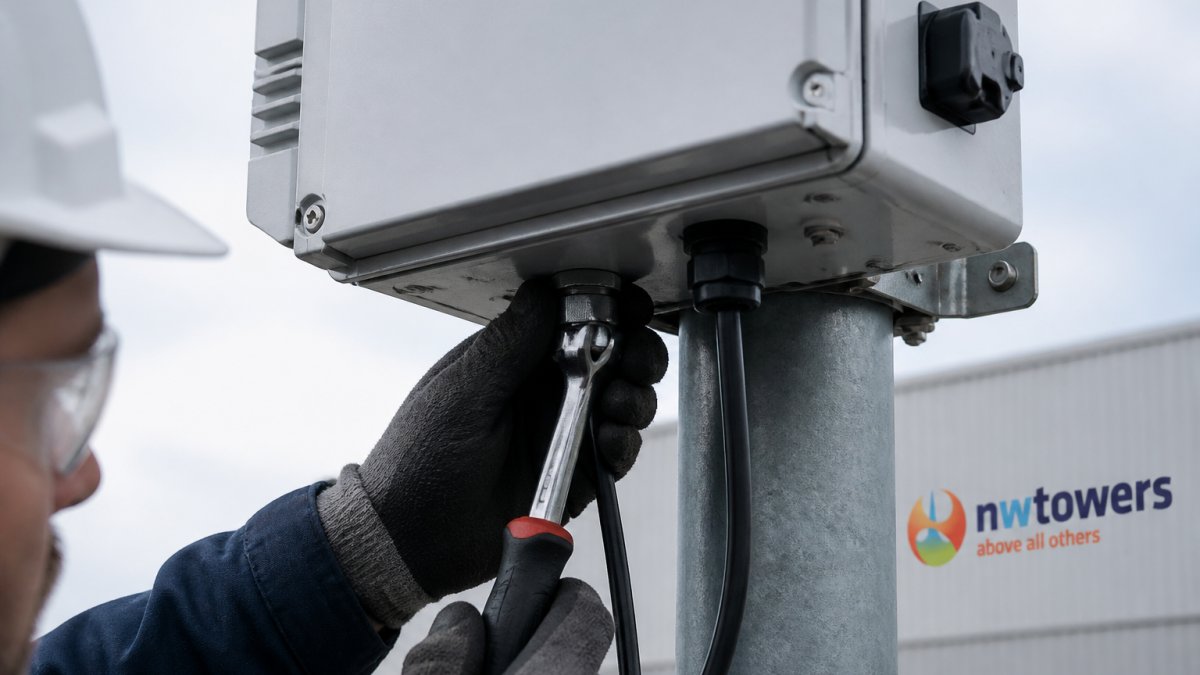
Follow this order:
For sites running rugged power and data over a single cable, our Industrial 24V M12 PoE injector uses sealed M12 connections that remove open cable entries entirely. Pair it with armored CAT5e cable rated for outdoor runs, and the entry point stays protected end to end.
Condensation control starts with moving air and managing temperature, not with sealing harder. A fully sealed box traps the vapor already inside.
Options that work:
Pick based on box size and climate. A small box in a mild site may only need a breather. A large enclosure in a cold, wet site usually needs a heater plus a breather.
For a deeper look at cold-weather protection, see our guide on winterizing industrial connectivity networks.
Sealing an enclosure for moisture protection almost always degrades radio performance, and most guides ignore the trade-off. Metal enclosures attenuate signal, tight gaskets and sealed cable entries remove paths for RF leakage, and antenna placement decisions made during installation determine whether the radio inside can reach the network. Plan the RF path before you seal anything.
Every material between the radio and the outside world costs signal. A sealed metal box acts as a Faraday cage: it blocks the radio’s own signal from escaping and blocks incoming signals from reaching the antenna.
The practical rule: if the radio has an external antenna connector, use it. Mount the antenna outside the enclosure on a sealed bulkhead connector.
Antenna placement matters as much as the enclosure. Keep these guidelines in mind:
Signal strength measured with the lid open is meaningless. After the enclosure is sealed and the antenna is mounted, verify received signal strength and link quality at the actual operating distance. If the signal is marginal, adjust antenna orientation or height before assuming the radio is faulty.
For sites running rugged power and data over a single cable, our Industrial 24V M12 PoE injector uses sealed M12 connections that remove open cable entries entirely.
A wireless equipment enclosure maintenance checklist turns a one-time install into a routine. Most failures we see trace back to a seal that was never checked or a vent that clogged silently. Build the check into your site schedule and the box lasts far longer.
Set intervals by what the site faces, not by a fixed calendar:
These intervals are starting points. Adjust based on what you find: a site that shows gasket hardening at 6 months needs a shorter cycle.
Run this at every site visit:
Use this table to separate ingress from condensation and to find the likely cause before you reseal anything:
| Symptom | Likely Cause | First Check |
|---|---|---|
| Water droplets on top surfaces and cold metal | Condensation | Vent clear? Heater working? Desiccant saturated? |
| Water pooling at the bottom or near cable entries | Liquid ingress | Gland tight? Drip loop present? Unused entries capped? |
| Corrosion on circuit boards but dry walls | Condensation cycling | Breather and heater operation |
| Corrosion near a seam or screw boss | Ingress at that interface | Gasket compression and screw torque |
| Intermittent wireless faults after rain | Moisture in connector or coax | Connector seal and bulkhead tightness |
| Gasket flattened or cracked | Compression set or UV aging | Replace gasket; add weather cover if none |
If you find liquid water but the gaskets look intact, check the cable entries first. A gland that was tightened on a cold day can loosen as the jacket relaxes.
For a full preventive routine, our wireless network uptime guide for mines walks through the same maintenance steps in detail.
Keeping moisture out of an outdoor wireless enclosure comes down to treating water ingress and condensation as two problems, then sealing every path and checking the seals on a schedule. That is the difference between a network that survives the weather and one that fails in it.
Northwest Towers builds rugged industrial wireless products for harsh sites. We design IP-rated enclosures and networking gear, back them with network engineering and deployment, and offer fully managed Network as a Service with little to no capital investment.
Get started with Northwest Towers and specify enclosures built to keep moisture out for the life of the deployment. Contact us to plan your site.
Water ingress is liquid pushed in from outside through a gasket, cable entry, or damaged cover. Condensation forms inside when warm, humid air cools against the enclosure walls and drops out of suspension. The fixes differ: ingress calls for better seals, glands, and covers, while condensation calls for pressure equalization, desiccant, or an anti-condensation heater. Diagnosing which one you have matters because sealing a box tighter can make condensation worse if you never address internal humidity.
Match the rating to the exposure, not to the highest number on the market. The first digit covers solids and dust, the second covers water. For rain and splash on a pole-mounted access point, IP65 or IP66 is a common baseline. For locations exposed to washdown or standing water, look higher. Check that the rating applies to the assembled enclosure with glands and covers fitted, since an enclosure tested bare does not reflect real installation conditions.
Inspect gaskets and glands at least twice a year on exposed sites, and quarterly where dust, vibration, or temperature cycling is severe. Add a check after any storm event or maintenance visit that opens the enclosure. Replace compressed or cracked gaskets rather than re-torquing them, and confirm gland bodies are still tight against the wall. A short maintenance checklist with dates logged per enclosure catches most failures before they take the radio offline.
They reduce it, but they work differently. A drain breather fitting lets air pass while blocking liquid water, which equalizes pressure and limits the draw of humid air through seals during temperature cycling. Desiccant absorbs moisture already inside the box and needs periodic replacement. Neither fixes an active leak. Use them alongside good gaskets and cable glands, and check the desiccant at every maintenance visit so it does not sit saturated.