
Last Updated: October 20, 2026
A 2×2 MIMO antenna is a cellular antenna that carries two transmit and two receive signal paths at once, letting a router or gateway use two spatial streams instead of one. At Northwest Towers, we build antennas for sites where a dropped link stops operations, and the 2×2 configuration is the workhorse of that lineup.
The core benefit is diversity. Two antenna elements spaced apart catch the same signal at slightly different moments, and the modem combines those streams to improve signal strength and throughput. On a marginal link, that difference often separates a usable connection from a stalled one. The tradeoff: 2×2 MIMO does not multiply your peak speed the way a 4×4 setup can. It stabilizes what you already have.
Below, we break down 2×2 MIMO antenna specs and placement so you can pick the right unit for a 5G router, gateway, or hotspot on a live site.
Most 2×2 MIMO antenna listings give you a gain figure and a connector type, then leave you to guess whether the unit will actually work at your site. The comparison below organizes the decision around the five specifications that determine real-world performance: frequency coverage, gain, radiation pattern, connector type, and cable length. Use it to shortlist candidates before you check compatibility with your specific router or gateway.
|
Specification |
What to Check |
Why It Matters |
|---|---|---|
|
Frequency range |
Must include your carrier’s bands (e.g., 600 MHz low-band through 3.7-4.2 GHz mid-band for 5G) |
An antenna that misses your band delivers no improvement regardless of gain |
|
Gain |
2-4 dBi for omnidirectional; 8-12 dBi for directional panel |
Higher gain focuses signal but narrows coverage area; match to your distance from the tower |
|
Radiation pattern |
Omnidirectional for multi-tower sites; directional for a single known tower |
Pattern determines whether you need to aim the unit and how sensitive placement becomes |
|
Connector type |
SMA male/female or N-type, matching your router’s ports |
Mismatched connectors require adapters that add loss and a failure point |
|
Cable length |
Shorter is better; every additional foot of coax removes signal |
A high-gain antenna on a long cable can underperform a modest antenna mounted close |
For a rugged 2×2 MIMO antenna built for outdoor industrial sites, our rugged antenna and connectivity products are engineered with weather-rated connectors, short cable runs, and mounting hardware that survives vibration and temperature swings. That combination matters more than a gain number on a spec sheet.
A common pattern among buyers is to fixate on gain while ignoring cable loss and connector mismatch. The antenna that wins on paper often loses in the field because the installation introduces 2-3 dB of loss through adapters and long coax. Compare complete setups, antenna plus cable plus connectors, rather than the antenna alone.
The 2×2 vs 4×4 MIMO antenna decision comes down to three hard constraints: how many antenna ports your modem exposes, how many spatial streams the serving tower transmits, and whether your throughput demand justifies the extra hardware.
Port count is the first gate. Check your router or gateway spec sheet for the number of external antenna connectors. Many consumer 5G routers expose two ports (2×2), while higher-end gateways and industrial modems expose four (4×4).
Tower support is the second gate. Even with a 4×4-capable modem, the tower must transmit four spatial layers on your band for 4×4 to deliver throughput gains. In marginal signal conditions, low SNR, long distance, heavy interference, the modem may fall back to fewer streams regardless of antenna configuration.
Throughput demand is the third gate. For industrial monitoring, asset tracking, remote control, and backup connectivity, 2×2 delivers the reliability needed at lower cost and complexity. For high-bandwidth backhaul or primary internet service, 4×4 can pay off when the first two gates are satisfied.
4×4 earns its keep when all three conditions align: a four-port modem, a tower transmitting four layers on your band, and a throughput requirement that exceeds what two streams can deliver. In that scenario, 4×4 can roughly double peak throughput compared with 2×2 under good signal conditions. Outside that scenario, the extra elements add cost without measurable benefit.
A practical approach is to start with 2×2, measure throughput and signal quality, then upgrade to 4×4 only if the modem reports unused capacity and the tower confirms four-layer transmission on your band. For most industrial sites, 2×2 remains the workhorse configuration.
For sites that need a proven 2×2 configuration with rugged mounting and weather resistance, our rugged antenna and connectivity products are built for exactly that environment.
Picking a 2×2 MIMO antenna for a 5G router starts with three checks: band coverage, connector type, and gain. The antenna must cover the frequency bands your carrier uses, physically connect to your gateway, and offer enough gain to close the link at your distance from the tower. Skip any one of these and the best antenna on paper becomes a paperweight.
Band coverage matters most. A 5G router may operate across low bands near 600 MHz and mid bands into the multiple-gigahertz range. Confirm the antenna’s frequency range includes the bands your carrier actually serves at your site.
Connector and cable decide whether the antenna physically works with your device. Match SMA or N-type connections and keep cable runs short to limit signal loss.
Before ordering, verify that your modem supports 2×2 MIMO on the bands you need, that the router has two external antenna ports, and that the antenna’s frequency band list matches your carrier. A quick call to your carrier about local band usage saves a return shipment. For a full compatibility review, 3GPP specifications for LTE and 5G NR define the band structure your hardware must support.
MIMO antenna placement decides more of your outcome than the antenna model itself. Mount the unit as high as practical, clear of metal structures and equipment that block signal, and aim directional models toward the serving tower. Keep the two elements separated as the design intends, and route cable away from power runs that can introduce noise.
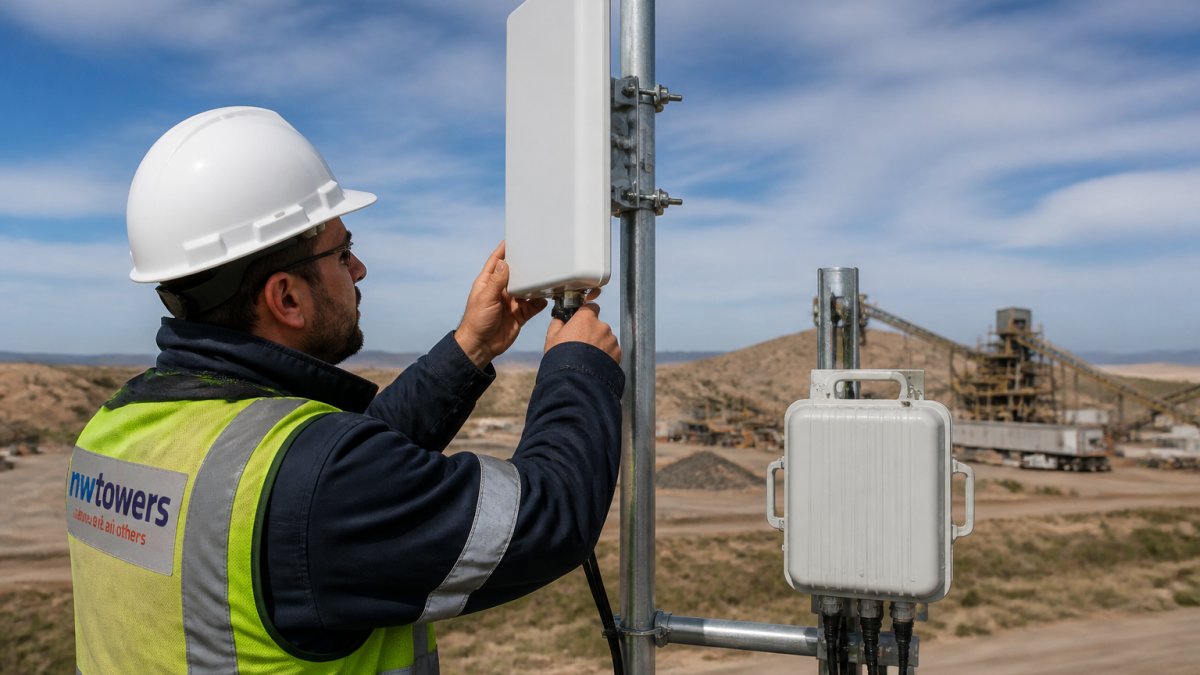
For directional antennas, small aiming adjustments produce large signal changes. Make one change at a time and record signal strength and latency after each move. On vehicles and mobile rigs, a magnetic mount speeds repositioning, but confirm it holds at speed.
Mounting an antenna behind a metal wall or inside a metal enclosure kills the signal before it reaches the elements. If your signal strength barely moves after install, check the mounting location before blaming the hardware.
Cable loss quietly erodes the gain you paid for. Every additional foot of coaxial cable and every extra adapter removes some signal, so keep runs as short as the site allows and use quality cable rated for your frequency range. A high-gain antenna on a long, lossy run can perform worse than a modest antenna mounted close to the router.
Match connectors precisely. SMA and N-type are common, and adapters work but add loss and a failure point. For outdoor mounting, use weather-rated connectors and seal them against moisture. Splitters let one antenna feed multiple radios but divide signal, so use them only when the tradeoff is acceptable.
Expect a 2×2 MIMO antenna to improve signal stability and throughput on a marginal link, not to create coverage where none exists. If the tower is too far or blocked by terrain, no antenna fixes it. Set expectations around reliability gains, then measure signal strength, latency, and throughput before and after install to confirm the improvement.
The most common mistakes we see: buying an antenna that does not cover the carrier’s bands, running cable too long, aiming a directional unit at the wrong tower, and mounting behind obstructions. For guidance on cellular signal fundamentals, FCC consumer information on wireless coverage explains how coverage and interference affect real performance.
A 2×2 MIMO antenna is a targeted fix for a weak or unstable link, and it rewards careful selection and placement. For industrial sites that need weather resistance, rugged mounting, and engineering support, our rugged antenna and connectivity products are built for exactly that environment.
A 2×2 MIMO antenna carries two transmit and two receive paths, which is what most cellular routers, hotspots, and gateways support. A 4×4 MIMO antenna adds two more antenna elements and spatial streams, so it can raise throughput on bands and devices that support four layers. The catch is that 4×4 only helps when your modem, the tower, and the band all support it. If your router has two antenna ports, a 2×2 MIMO antenna is the correct match and a 4×4 unit adds cost without benefit.
Yes, but you lose the extra spatial streams. A 4×4 gateway has four antenna ports; connecting a 2×2 antenna uses only two of them, so the gateway runs in 2×2 mode. That is fine for moderate signal areas, but if you bought a 4×4 gateway for throughput, pair it with a 4×4 antenna or two 2×2 units where the hardware allows. Check the gateway manual before assuming which ports map to which radio chains.
Mount the antenna as high as practical with a clear line of sight toward the serving tower, and keep the two elements separated per the manufacturer’s spacing. Aim directional panels at the tower using the carrier’s coverage map or a signal meter. Keep the antenna away from metal walls, HVAC units, and radio equipment that causes interference. Short cable runs matter too: every extra foot of coax costs signal, so mount the antenna close to the router enclosure when you can.
MIMO mainly improves throughput and link reliability rather than raw range. The gain comes from sending multiple data streams and from combining signals at the receiver, which helps in multipath environments like urban sites and industrial yards. Antenna gain, height, and cable loss do more for range than the MIMO configuration alone. A high-gain directional 2×2 MIMO antenna aimed correctly will usually outperform a low-gain 4×4 unit at the edge of coverage.
Start with frequency coverage: confirm the antenna spans the bands your carrier uses, from low-band near 600 MHz up through the mid-band range around 2.7 GHz and into the higher 5G bands if relevant. Check connector type (SMA is common), cable length and loss, and whether the mount suits your site. For outdoor industrial deployments, weather resistance and IP rating matter as much as gain. Pricing depends on quantity, configuration, and delivery, so request a quote for site-specific needs.
A weak cellular link on a remote site is a business risk, not an inconvenience. Northwest Towers designs rugged 2×2 MIMO antennas and integrated connectivity platforms for mining, ports, construction, and utility deployments, backed by network design, deployment, and managed NaaS support. If you need reliable connectivity in a harsh environment, get in touch with our team to scope the right antenna and installation for your site.